Transform Your Designs with Pink Halloween Photoshop Layer Styles
When the leaves turn crisp and the air grows chilly, a unique energy fills the creative world. For designers, photographers, and digital artists, this season is synonymous with vibrant creativity. While traditional Halloween aesthetics often lean heavily into deep oranges, eerie greens, and midnight blacks, there is a growing trend that embraces a softer, more modern palette: Pink Halloween. This aesthetic combines the spooky fun of the holiday with a trendy, pastel, or neon pink twist that stands out in any portfolio or social media feed.
To help you achieve this look without spending hours manually adjusting every shadow, highlight, and texture, we introduce a specialized collection of Pink Halloween Photoshop Layer Styles. These tools are designed to streamline your workflow, allowing you to transform flat shapes, text, objects, and paper textures into stunning seasonal masterpieces with just one click.
Understanding the Power of Layer Styles
Before diving into the specific benefits of our Pink Halloween collection, it is essential to understand what layer styles actually are within the context of Adobe Photoshop. A layer style is a set of non-destructive effects applied to a specific layer. Unlike painting directly onto an image, which permanently alters pixels, layer styles sit on top of your content like a filter. You can toggle them on and off, adjust their intensity, or remove them entirely without ever damaging the original design element.
The primary purpose of these styles is efficiency. In the fast-paced world of digital design, time is money. Whether you are creating a party invitation, a promotional banner for a business, or a creative project for a blog, you need results that look professional but require minimal effort. Layer styles allow you to apply complex combinations of Drop Shadows, Bevels and Embossing, Inner Glows, and Color Overlays instantly.
For beginners, this might sound technical, but think of it as having a pre-made "magic wand" for your designs. Instead of learning how to blend modes, opacity settings, and gradient maps from scratch, you simply load a preset that has already been optimized by an expert designer.
The Unique Appeal of Pink Halloween
Why choose pink? The shift towards pink Halloween aesthetics represents a broader cultural change in how we celebrate holidays. It moves away from the purely terrifying and embraces a sense of whimsy, playfulness, and inclusivity. This color palette is particularly popular among:
- Social Media Influencers: Creating eye-catching thumbnails and stories that pop against standard feeds.
- Boutique Businesses: Marketing products to a demographic that appreciates a softer, more feminine take on the holiday.
- Event Planners: Designing invitations and decor themes for modern, chic Halloween parties.
- Education: Teachers creating engaging, colorful classroom materials that are festive but not overly scary for younger students.
By using these specialized styles, you ensure that your pink elements have depth and dimension. A flat pink shape can look boring, but when you apply a layer style with a glowing inner shadow and a soft outer glow, it transforms into a glowing pumpkin, a magical potion, or a stylish costume accessory.
How This .ASL File Works
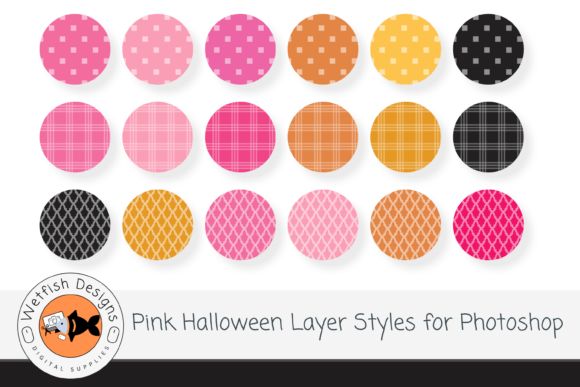
This file contains all 18 layer styles saved as a single .asl file. The .asl extension stands for Adobe Style Library. It is the universal format for saving presets in Photoshop. When you open this file in the software, you gain access to a curated library of 18 distinct effects, each tailored to the pink Halloween theme.
These styles are versatile enough to be used on a wide variety of assets. Here is how you can utilize them in your daily creative activities:
- Text Effects: Turn a simple headline into a glowing, textured piece of art. Imagine writing "Happy Halloween" in bold letters and applying a style that gives it a frosted glass look with a pink outline.
- Shapes and Objects: Do you have a basic circle or square? Apply a style to make it look like a ghost, a candy corn, or a floating orb of magic.
- Papers and Textures: If you are designing a flyer, you can apply subtle layer styles to paper backgrounds to give them a worn, vintage, or magical feel without needing to scan physical textures.
- Photos: Use these styles to create custom borders or frames around your photographs, unifying different images under a cohesive visual theme.
Installation Made Simple
One of the most common questions users ask is about compatibility. It is important to clarify that this file will ONLY work in Photoshop. It is not compatible with other graphic design software like Canva, Illustrator, or GIMP. However, if you use Adobe Photoshop, installation is incredibly straightforward.
You do not need to be a coding expert or navigate complex folders. Simply double-click the .asl file, and it will automatically launch Photoshop and add the styles to your existing panel. Once loaded, they appear alongside your default styles, ready for immediate use. This seamless integration means you can start working immediately after downloading.
Practical Applications in Modern Life and Business
The relevance of these tools extends far beyond simple hobby projects. In the modern digital economy, visual communication is paramount. Brands must capture attention within seconds, and unique color palettes are a powerful way to stand out.
For Small Business Owners: Consider a local bakery selling pink-frosted donuts shaped like skulls. Using these layer styles, you can quickly generate marketing graphics for Instagram that match your product perfectly. You can create consistent branding across all platforms, ensuring that your audience recognizes your unique "Pink Halloween" identity.
For Educators: Teachers often struggle to find resources that are both educational and engaging. By using these styles to decorate worksheets, presentation slides, or classroom decorations, educators can create an environment that feels festive and exciting without being overwhelming or frightening.
For Content Creators: YouTube thumbnails and blog headers require high-impact visuals. A standard orange pumpkin background is common; a stylized pink version with intricate shadows and glows will draw the eye and increase click-through rates. These styles provide the professional polish needed to compete in a saturated market.
Clarifying Common Misunderstandings
As with any digital asset, there are misconceptions that potential users should be aware of to manage their expectations correctly. One of the most frequent points of confusion involves the inclusion of patterns.
Patterns Are NOT Included: It is crucial to understand that while this package includes 18 highly detailed layer styles, it does not include pattern files (such as .pat files). A layer style affects the appearance of a shape or text, whereas a pattern is a repeating texture tile. Users expecting to download a pack of pink spiderweb or polka-dot textures will need to source those separately or create them manually. However, the layer styles themselves can often simulate texture through techniques like "Noise" or "Texture" overlays within the style settings.
Another misunderstanding relates to the scope of the software. As mentioned, this is strictly a Photoshop tool. Some users attempt to open .asl files in web browsers or mobile apps, only to find errors. Remember, the power of layer styles comes from the advanced rendering engine of the desktop version of Photoshop. There is no workaround for this requirement.
Maximizing Your Creative Potential
To get the most out of this collection, consider experimenting with blending modes and opacity. While the 18 styles are pre-configured to look great, the true magic happens when you tweak them slightly to fit your specific vision. Try changing the color overlay to a darker shade of magenta or lightening the drop shadow for a more ethereal look.
Furthermore, remember that layer styles are non-destructive. This is a game-changer for your workflow. If you decide halfway through a project that the pink is too bright, or the shadow is too harsh, you can go back into the style settings and adjust the numbers without losing your progress. You can also copy and paste these styles between layers, ensuring consistency across your entire design layout.
Why Efficiency Matters
In today's busy world, the ability to produce high-quality work quickly is a competitive advantage. Spending hours manually adjusting gradients and shadows for every single text box or icon is inefficient. By utilizing a dedicated set of Pink Halloween Photoshop Layer Styles, you reclaim that time. You can focus on the bigger picture—concept development, storytelling, and strategy—rather than getting bogged down in technical details.
Whether you are preparing for a last-minute party invitation or planning a month-long marketing campaign, having a reliable toolkit at your disposal ensures that your output remains consistent and professional. The ease of transforming shapes, objects, text, and papers with just one click removes the barrier between your idea and its realization.
Conclusion
The intersection of technology and creativity offers endless possibilities for those willing to explore new tools. The Pink Halloween Photoshop Layer Styles collection represents a perfect blend of seasonal spirit and technical utility. With 18 carefully crafted styles contained in a single, easy-to-install .asl file, this resource empowers designers of all skill levels to elevate their work.
While it requires Adobe Photoshop to function and does not include separate pattern files, the value it provides in terms of speed, consistency, and aesthetic appeal is undeniable. From small businesses looking to brand their holiday promotions to educators wanting to inspire their students, these styles offer a flexible solution for bringing a modern, pink twist to the classic Halloween theme. Embrace the trend, save time, and let your creativity shine with just a single click.