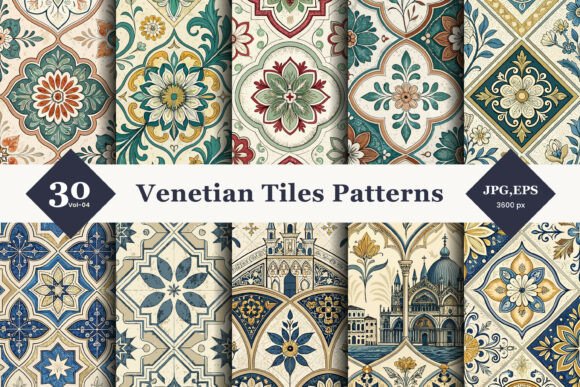
Venetian Tiles Seamless Patterns 04
Designing with traditional motifs requires more than just selecting a pretty image; it demands an understanding of how texture, scale, and continuity interact within a layout. Venetian Tiles Seamless Patterns 04 offers a sophisticated solution for creators looking to infuse their projects with the warmth and artistry of classic Mediterranean décor. This collection is not merely a set of images but a versatile toolkit designed to bridge the gap between historical elegance and modern digital application.
For designers, entrepreneurs, and hobbyists alike, the appeal lies in the balance between ornate detail and functional utility. The pack features rich floral designs, vintage linework, and distinct ornamental tile shapes that evoke a handcrafted feel. However, simply downloading a pattern pack does not guarantee a professional result. Many users overlook critical technical specifications and application strategies, leading to pixelated prints, awkward seams, or mismatched aesthetics. Understanding the nuances of these files—specifically the inclusion of both high-resolution JPGs and scalable EPS vectors—is essential for achieving the quality your project deserves.
Understanding the Value of Vector vs. Raster Formats
One of the most significant advantages of this specific pattern pack is its dual-format offering. It includes both 30 unique patterns in high-resolution JPG format at 300 DPI and corresponding EPS vector files. While many casual users might only glance at the preview images, professionals know that the distinction between raster and vector data can make or break a final product.
The Common Mistake: A frequent error occurs when designers attempt to use standard JPG files for large-scale printing, such as wall murals, fabric rolls, or oversized packaging. Even at 300 DPI, a raster image has a fixed pixel dimension. If you stretch a 12-inch by 12-inch JPG to cover a 6-foot banner, the image will become blurry, pixelated, and unprofessional. Conversely, relying solely on low-quality web previews for physical production leads to color shifts and resolution loss.
The Better Approach: Always utilize the included EPS vector files for any project requiring unlimited resizing. Because EPS files are based on mathematical paths rather than pixels, they remain crisp and clear regardless of scale. This is particularly important for Venetian Tiles Seamless Patterns 04, where the intricate linework and fine details of the floral motifs need to remain sharp. Use the JPGs for quick digital mockups, social media backgrounds, or small-scale print jobs like business cards or postcards, but switch to the vector source for anything larger than A3 size.
Avoiding Seamless Tiling Errors
The term "seamless" implies that the pattern repeats without visible breaks or jarring transitions. However, achieving a truly invisible seam requires careful handling during the design process. When applying Venetian Tiles Seamless Patterns 04 to textiles, wallpapers, or digital backgrounds, improper alignment can create noticeable grid lines or disjointed floral clusters that distract the viewer.
Overlooked Detail: Many beginners assume that once a pattern is labeled "seamless," it will automatically tile perfectly in any software environment without adjustment. In reality, different design applications (such as Adobe Illustrator, Photoshop, or Canva) handle tiling differently. Some may require manual offset adjustments, while others might introduce slight gaps due to rendering differences.
Practical Advice: Before committing to a full project, always create a test tile. Duplicate the pattern element four times to form a 2x2 grid. Zoom out and inspect the joints between the tiles. Look for broken lines in the vintage linework or misaligned flower centers. If you notice gaps, check the edge alignment settings in your software. For textile designers, ensure that the repeat unit matches the weave structure of the fabric to prevent distortion during the manufacturing process.
Color Accuracy and Print Readiness
Mediterranean décor often relies on warm earth tones, deep blues, and creamy whites. While the visual appeal of Venetian Tiles Seamless Patterns 04 is evident on screen, translating these colors accurately to physical media is a common challenge. Digital screens emit light, whereas printed materials reflect it, leading to discrepancies in hue and saturation.
The Pitfall: Designers frequently export files in RGB color mode for print projects. RGB is optimized for screens and uses a wider gamut of colors than CMYK, which is used by printers. When an RGB file is converted to CMYK without prior adjustment, vibrant blues may turn muddy, and bright reds may appear dull. This results in a final product that looks significantly different from the digital preview, potentially ruining the intended aesthetic.
Solution: Check your color profiles before finalizing your designs. If you are using the EPS files, ensure they are set to CMYK if you are sending them to a professional printer. If you are creating digital backgrounds or web graphics, stick to sRGB to ensure consistency across devices. The high-resolution nature of the JPG files (300 DPI) makes them suitable for high-quality inkjet printing, provided the color management is handled correctly.
Selecting the Right Application for Your Project
Venetian Tiles Seamless Patterns 04 is marketed as suitable for textiles, product packaging, digital backgrounds, and home décor prints. However, not every pattern works well for every medium. The density of the floral design and the thickness of the linework must be considered relative to the final output size.
- Textiles: For clothing or upholstery, consider the scale of the pattern. Large, intricate tiles may look overwhelming on a small garment. Test the pattern at actual size to ensure the floral elements are proportionate to the wearer or user.
- Packaging: Product boxes benefit from the elegance of Venetian styles, but ensure there is enough negative space around the pattern to accommodate logos and text. Cluttered designs can reduce readability and brand impact.
- Digital Backgrounds: When using these patterns for website headers or app interfaces, keep the contrast high enough to ensure text remains legible. Overlaying semi-transparent layers can help balance the busy nature of traditional tilework with modern UI requirements.
Evaluating Quality Before You Download
While instant download provides convenience, it also places the responsibility of quality assurance on the buyer. Before integrating Venetian Tiles Seamless Patterns 04 into your workflow, take a moment to verify the integrity of the files. Open the EPS files in a vector editor to check for stray anchor points or unnecessary complexity that could slow down your computer. Inspect the JPGs for compression artifacts, especially in the darker areas of the floral designs.
Additionally, review the licensing terms associated with the pack. Ensure that your intended use—whether commercial, editorial, or personal—aligns with the provider’s guidelines. Misunderstanding usage rights can lead to legal issues later, particularly for small business owners and marketers who incorporate these designs into products for sale.
Final Thoughts on Integration
The success of using Venetian Tiles Seamless Patterns 04 lies in respecting the craftsmanship behind the design while applying modern technical best practices. By leveraging the vector formats for scalability, ensuring proper color management for print, and carefully testing seamless repeats, you can avoid common pitfalls that degrade design quality. Whether you are a seasoned graphic designer updating a client’s brand identity or a hobbyist creating custom home décor, this pack offers the versatility needed to achieve a polished, professional look. Take the time to understand the tools at your disposal, and the results will speak for themselves.