Opal Textures Seamless Patterns: A Practical Guide for High-Quality Creative Projects
If you are looking to elevate your digital designs without compromising on visual depth, Opal Textures Seamless Patterns offer a sophisticated solution that bridges the gap between subtle elegance and professional polish. These digital assets are not merely decorative backgrounds; they are versatile tools designed to add a layer of tactile realism to flat screens. Whether you are a seasoned graphic designer crafting a brand identity or a hobbyist creating personalized birthday invitations, the ability to seamlessly repeat a texture is crucial for maintaining a cohesive look across various media.
Many creators rush into purchasing digital papers without fully understanding the technical specifications required for their specific output. This often leads to frustrating experiences where images appear pixelated on large prints or lose their vibrant sheen when resized. By focusing on the unique attributes of high-quality seamless patterns like these, you can avoid common pitfalls related to resolution, file formats, and licensing expectations.
Understanding the Technical Foundation
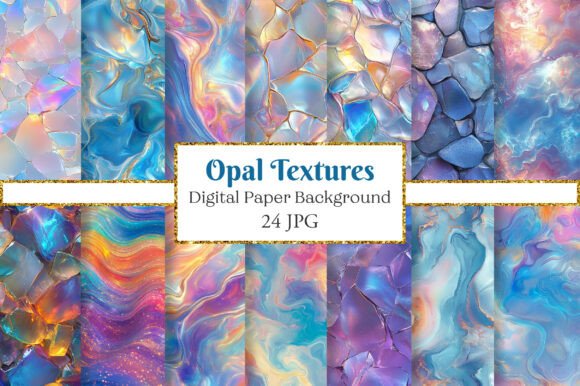
The core value of Opal Textures Seamless Patterns lies in its technical precision. When selecting digital papers for professional work, the resolution is non-negotiable. This set features files with a 300 dpi resolution at a size of 12″ x 12″. Why does this matter? In the world of printing, 300 dots per inch is the industry standard for sharp, crisp output. Anything lower than this threshold risks producing blurry edges or visible pixelation, especially when the design is scaled up for packaging, large banners, or high-resolution web graphics.
A frequent mistake among beginners is assuming that all "digital papers" are created equal simply because they come in a bundle. Some low-quality sets are optimized only for screen viewing (72 dpi), which makes them useless for any physical product. By choosing a set that explicitly guarantees 300 dpi, you ensure that your work remains viable for both digital display and tangible applications like scrapbooking or wedding stationery.
Common Pitfalls in Digital Asset Selection
Even experienced users can fall into traps when evaluating digital textures. One of the most overlooked details is the file format compatibility. While JPG is a widely accepted standard for its balance of quality and file size, it lacks transparency. If your project requires placing the pattern over a complex background or integrating it into a layered design in software like Adobe Photoshop or Canva, understanding how JPGs handle alpha channels is essential. Unlike PNGs, JPGs do not support transparent backgrounds, meaning you must be prepared to crop or mask the edges if you need the pattern to sit behind other elements seamlessly.
Another critical error involves the assumption of immediate usability without checking software requirements. The prompt mentions that these patterns are easy to resize with different software. However, resizing an image down is generally safe, but enlarging it beyond its original dimensions—even from a 12-inch base—can degrade the texture's integrity. To maintain the opal-like shimmer and smooth gradients, always start with the highest resolution source available before scaling down for social media thumbnails or mobile banners.
Furthermore, buyers often overlook the distinction between physical and digital products. It is vital to remember that this purchase provides an immediate download with no physical item shipped. There is no waiting period for delivery, but there is also no option to return a "damaged" print. Once the download begins, the transaction is final. Ensuring you have adequate storage space and the correct software to open the files is a prerequisite step that many skip, leading to frustration upon receipt.
Maximizing Versatility Across Creative Fields
The true power of Opal Textures Seamless Patterns emerges when you apply them across diverse projects. Because the set includes 24 unique digital papers, you have a vast palette to choose from without needing to hunt for multiple sources. This variety is particularly useful for entrepreneurs and small business owners who need consistent branding across different touchpoints.
- Wedding and Event Planning: Use the softer opal tones for elegant birth announcements or invitation suites. The seamless nature ensures that when you print these on cardstock, the pattern flows naturally without jarring interruptions at the fold lines.
- Social Media Marketing: Marketers can utilize these textures as background layers for Instagram stories or Facebook covers. The 300 dpi quality ensures that even when viewed on high-density mobile screens, the text overlays remain legible against the textured backdrop.
- Scrapbooking and Planners: Hobbyists can print these pages to create planner stickers or journaling cards. The high resolution allows for cutting out precise shapes without losing detail around the edges.
- E-commerce Packaging: For sellers of handmade goods, these patterns can be printed on tissue paper or labels, adding a premium feel to unboxing experiences.
When applying these textures, avoid the mistake of letting the pattern overpower the content. Opal textures are inherently eye-catching due to their iridescent qualities. The best approach is to use them as a supporting element, perhaps by lowering the opacity or overlaying solid color blocks to highlight text or key imagery. This technique preserves the aesthetic appeal while ensuring your message communicates clearly.
Evaluating Quality Before You Download
Before committing to a purchase or starting a new project, take a moment to evaluate your workflow needs. Do you require transparency? If so, be aware that JPG files will require extra steps to isolate the pattern. Do you plan to print immediately? Confirm that your printer supports the specific paper weight and ink type needed to reproduce the fine details of the opal finish.
Additionally, consider the scalability of your project. If you are designing a website banner, the 12″ x 12″ size is more than sufficient. However, if you intend to use the pattern for a billboard or a large-scale wall mural, you may need to explore vector-based alternatives or ensure the software you use can upscale the image without introducing artifacts. While this set is excellent for most standard creative applications, knowing its limits prevents disappointment.
By following these guidelines and respecting the technical specifications of Opal Textures Seamless Patterns, you can produce work that looks polished and professional. The goal is to enhance your creativity, not hinder it with technical limitations. With 24 unique options ready for immediate download, the potential for innovation is vast. Whether you are designing a simple blog post header or a comprehensive wedding collection, these digital papers provide the reliable foundation you need to bring your vision to life.
To get the most out of this collection, experiment with blending modes in your design software. Layering these textures can create depth that flat colors cannot achieve. Remember, the difference between a good design and a great one often comes down to the subtle choices made in texture and lighting. Let these patterns guide you toward higher standards in your creative output.