Watercolor Seamless Patterns with Bees: A Practical Guide to Choosing and Using Digital Assets
Creating cohesive visual designs requires more than just picking a pretty image. Whether you are launching a small business, designing custom packaging, or crafting digital scrapbooks, the quality and versatility of your assets determine the final outcome. One popular choice among creators is Watercolor Seamless Patterns with Bees. This specific aesthetic combines soft, organic textures with charming motifs like honey jars, beehives, and wildflowers. However, before downloading or purchasing these assets, it is crucial to understand their technical specifications and practical applications to avoid costly mistakes.
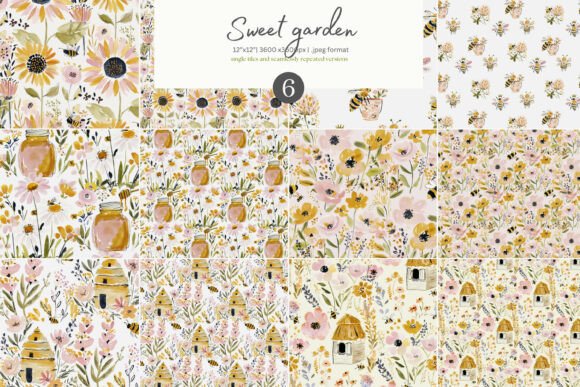
The appeal of this pattern set lies in its warm yellow and blush tones, which evoke feelings of sweetness, nature, and nostalgia. For entrepreneurs selling stationery, fabric, or home decor, these patterns offer a ready-made solution that aligns with current trends in feminine and rustic design. Yet, many beginners overlook critical details regarding file formats, resolution, and background transparency, leading to frustration during the production phase. This guide aims to help you navigate these pitfalls effectively.
Understanding the Technical Specifications
When evaluating digital pattern sets, especially those marketed as "seamless," the devil is in the details. The Watercolor Seamless Patterns with Bees collection typically includes six distinct seamless patterns. Each pattern is provided in two sizes: 3600 x 3600 pixels (which equates to 12 x 12 inches at 300 DPI) and single tile versions. Understanding the difference between a single tile and a seamlessly repeated version is vital for proper usage.
A single tile is the base unit of the pattern. When tiled correctly, it repeats without visible seams. The included files often provide both the raw single tile and a pre-tiled version showing four tiles combined. This dual format is helpful for previewing how the pattern looks when extended across a larger surface, such as a piece of fabric or a website background. However, if you intend to use the pattern for large-scale printing, relying solely on the low-resolution preview can result in pixelation. Always ensure you are working with the high-resolution 300 DPI .jpeg files to maintain clarity and sharpness in your final product.
The Importance of Resolution and DPI
One of the most common errors in digital design is ignoring the dots per inch (DPI) setting. A screen display typically operates at 72 DPI, but professional printing requires 300 DPI. If you download a pattern intended for web use and attempt to print it on a tote bag or gift wrap, the image will appear blurry and blocky. The Watercolor Seamless Patterns with Bees set is specified at 300 DPI, making it suitable for high-quality physical prints. Before starting any project, verify that your software settings match the asset’s resolution. Scaling down a high-res image is easy; scaling up a low-res image destroys quality irreversibly.
Addressing Background Transparency Issues
A significant misunderstanding among new designers involves the assumption that all digital patterns have transparent backgrounds. It is important to note that in this specific collection, the patterns do not have transparent backgrounds. Instead, they feature solid or opaque backdrops that complement the watercolor style. This distinction affects how you layer and composite your designs.
If you need a pattern that sits behind text or other elements without blocking them out, you cannot simply place this file over another layer expecting it to blend invisibly. You must either edit the background color to match your canvas or use masking techniques to isolate specific elements like the bees or flowers. Failing to account for this can lead to awkward white boxes appearing around your designs in digital mockups or printed materials. Being aware of this limitation allows you to plan your layout accordingly, perhaps by using the pattern as a full-bleed background rather than an overlay.
Common Mistakes in Application
Even with high-quality assets, improper application can ruin a project. Here are several areas where creators often stumble when using watercolor bee patterns.
- Ignoring Color Profiles: Watercolor art relies on subtle gradients. Ensure your design software is set to the correct color profile (usually CMYK for print, RGB for digital). Converting from RGB to CMYK after the design is complete can dull the vibrant yellows and blush tones, making the artwork look muddy.
- Incorrect Tiling Alignment: When creating custom fabrics or wallpapers, the seam between tiles must be invisible. While the provided files include a seamlessly repeated version, you should always check the edges of your own compositions. Misaligned tiles create distracting lines that break the immersion of the design.
- Overlooking File Formats: The set includes .jpeg files. While JPEGs are convenient, they are lossy compressed formats. If you need to make further edits to the individual elements (like moving a single flower), a JPEG is not ideal because it flattens the layers. For heavy editing, seek out PNG or PSD versions if available, or be prepared to work with the flattened images carefully.
Best Practices for Creators and Entrepreneurs
To get the most value from Watercolor Seamless Patterns with Bees, consider these practical strategies. First, test print a small section before committing to a large run. Colors on screens differ significantly from ink on paper. A soft blush tone might appear pinker on a monitor than it does on cotton fabric. By testing first, you can adjust saturation levels in your design software to compensate for this shift.
Secondly, leverage the variety within the set. With six different patterns, you can mix and match elements to create unique products. Use the floral paper pattern for wrapping paper, the bee pattern for textile prints, and the mixed motif for greeting cards. This versatility maximizes the return on your investment. Additionally, these patterns are excellent for digital projects. Bloggers and content creators can use them as headers, sidebar decorations, or email newsletter backgrounds, provided they respect the licensing terms associated with the purchase.
Evaluating Quality Before Purchase
Not all pattern sets are created equal. When browsing options, look for previews that show the tiling clearly. If the seller only provides a single tile without showing how it repeats, there is a risk that the pattern may not be truly seamless. Check for reviews mentioning edge alignment. Furthermore, examine the sample images closely. High-quality watercolor patterns should show brushstroke texture and natural color variations, not flat, artificial coloring. The description mentions "warm yellow and blush tones," so ensure the samples reflect this palette accurately to match your brand identity.
Conclusion on Asset Selection
Using Watercolor Seamless Patterns with Bees can elevate your creative projects, from handmade crafts to digital marketing materials. However, success depends on respecting the technical constraints of the files. By understanding the non-transparent backgrounds, prioritizing 300 DPI resolution, and testing prints before mass production, you can avoid common pitfalls. These patterns offer a charming, professional touch that resonates with audiences who appreciate handcrafted aesthetics. Approach the selection process with diligence, and you will find that these assets serve as powerful tools in your design arsenal.